Cloud Secret Manager
Google Cloud Secret Manager provides a secure and convenient way to store and manage sensitive information such as API keys, passwords, and other credentials. We rely on it to keep all of our platform’s secrets centralized and accessible only to authorized users and services.

Updating Secrets
- Add a New Version
When a secret needs updating (for example,
AWS_SECRETSused by the Users and Academy microservices), we create a new version of that secret in Secret Manager rather than modifying the existing version. - Redeploy the Service After adding the new secret version, we redeploy the services (e.g., Users, Academy) that depend on it. This ensures the newly updated secret is in use without requiring any code changes.
File-Based Secrets
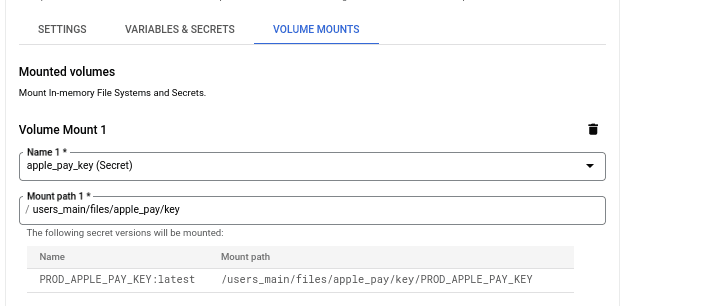
You can also store entire files as secrets. In our codebase, for instance, we have apple_pay_certificate and apple_pay_key files. These are passed to the application at runtime by mounting them as volumes. This approach allows us to securely store sensitive file contents in Secret Manager and then inject them where needed during deployment.
Check the image below: